Stop managing
the board.
Let it manage the work.
Every task, comment, and update syncs the instant it happens. Pilot handles the busywork on its own, and an AI project manager reads the whole board to tell you what's slipping before you have to ask.
No credit card required. See how it works ▸




Built for teams who'd rather move a card than write a status update.
brevo
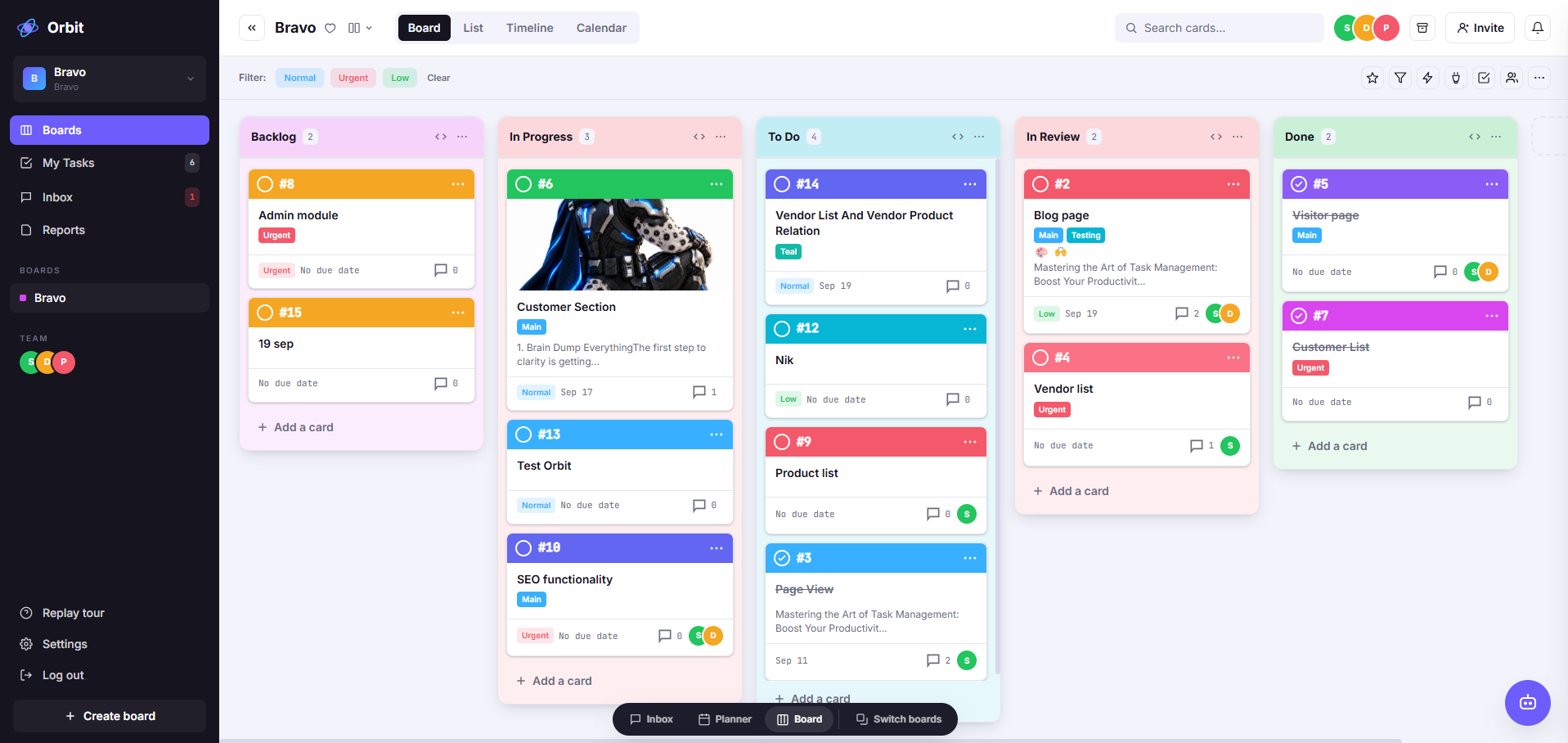
Welcome to Orbit — try dragging me to another list
Communities
Welcome to Orbit — try dragging me to another list
+ Add a card
Vendor List
Seos
+ Add a card
Fix login bug
Identify and troubleshoot the current issues with the login…
Free-plan color test
+ Add a card
Pages
MainCreate and design the main content pages for the project…
+ Add a card
Testing
MainRealtime sync test
+ Add a card
Welcome to Orbit — try dragging me to another list
To DoVendor List
In ProgressFix login bug
In ReviewTesting
DoneTimeline
WED
9
THU
10
FRI
11
SAT
12
SUN
13
MON
14
TUE
15
WED
16
THU
17
FRI
18
what's inside
Everything your team needs, built in, not bolted on.
Boards
Drag-and-drop lists and cards for however your team works.
Inbox
Capture a to-do the second you think of it, sort it later.
Calendar
Every due date across every board, laid out by day.
Pilot
Trigger → condition → action automation for busywork.
Power-Ups
Live-sync a board to Google Sheets, with more on the way.
Real-time sync
Every move and comment lands on every screen instantly.
Filters
Narrow any board down by member, status, or label.
Public sharing
Hand anyone a read-only board link, no login required.
orbit 101
Everything stays exactly where you left it.
Capture something quick, plan it on a board, or check what's due today: Inbox, Boards, and Calendar keep every to-do in one place, no matter how small.
Inbox
2Book the venue for kickoff
Reply to vendor email
Backlog
2Book the venue for kickoff
Draft agenda
the card
One card can hold the whole story.
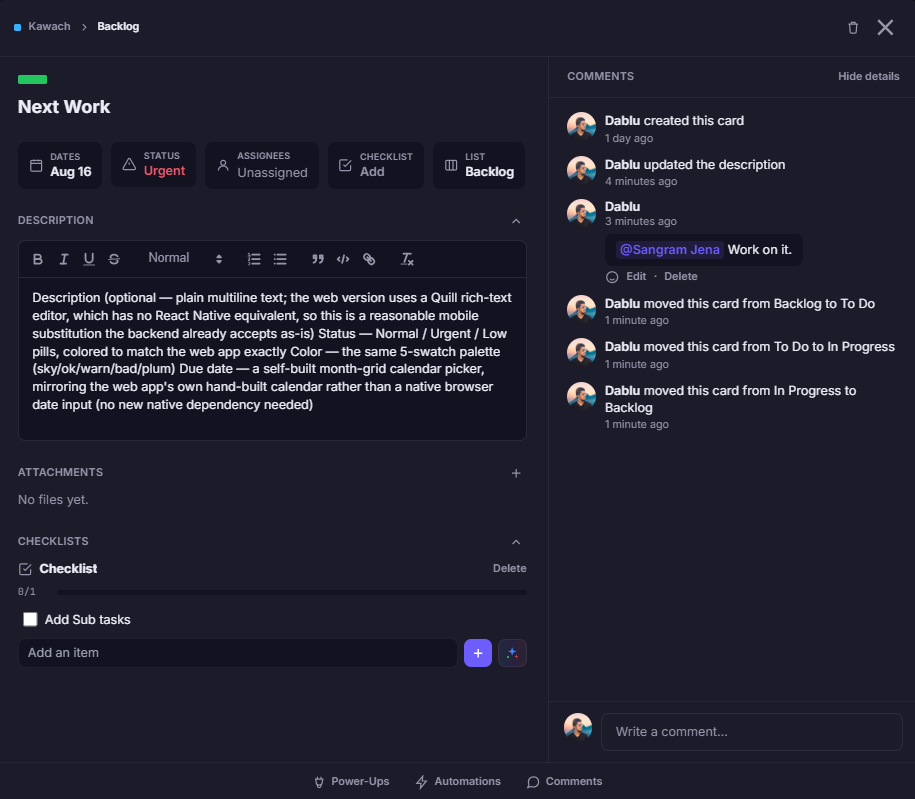
Every card is more than a title: it's a place for the checklist, the file, the back-and-forth, and the "who's on this" that used to live in five different tools.
- Checklists with their own progress bar, so a card shows how close it really is.
- Comments with emoji reactions, so a quick 👍 doesn't need its own reply.
- File attachments and cover images, dropped straight onto the card that needs them.
- Labels, status, assignees, and due dates, all filterable, all visible at a glance from the board.
one board, four angles
See the same work the way you actually think about it.
Switch the view, not the tool. Every card, comment, and due date stays exactly where it is — you just change the angle you look at it from.
Board
The kanban you already picture. Drag a card between lists and everyone watching sees it land.
List
Every card as a flat row, with its list and owner beside it. The fastest way to scan a busy board.
Timeline
Lists down the side, days across the top, every dated card in its slot. Overlaps become obvious.
Calendar
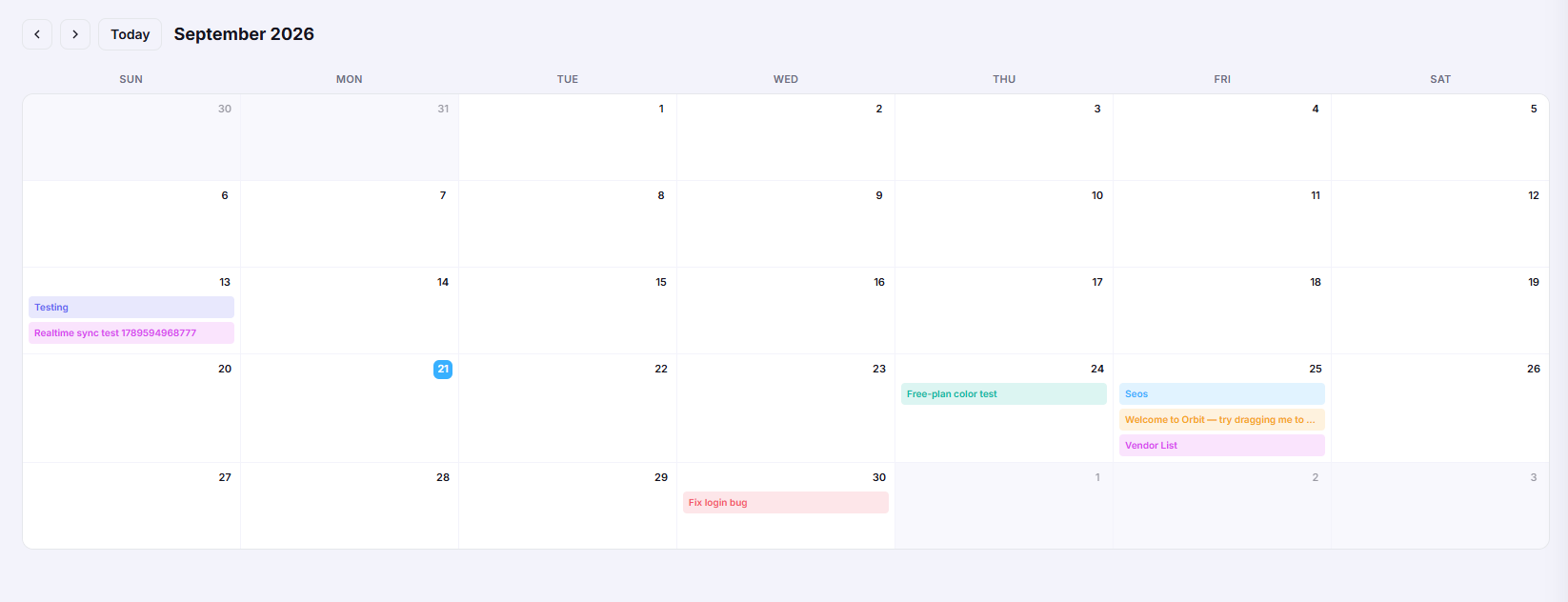
Cards sitting on the days they're due, month by month. The view people open on Monday morning.
Never miss what changed.
Every move, edit, comment, and file lands on everyone's screen in real time, on the web, and in your pocket.
live board sync
This is the actual board, not a mockup.
Drag a card or a whole list and everyone watching the board sees it animate into place within seconds. What's on your screen is exactly what your team sees, at the same moment.
on the go
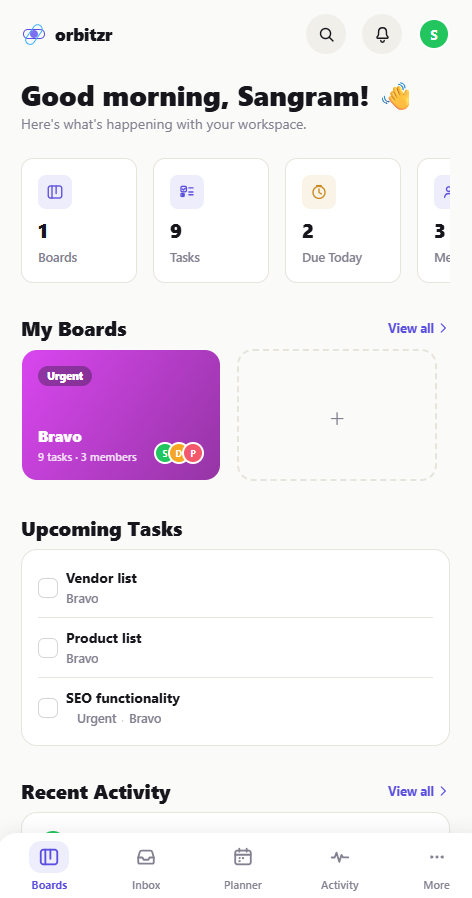
You can't miss it: manage every board from your pocket.
The OrbitZR mobile app puts your Pulse Feed front and center: every card moved, every color changed, the moment it happens, so stepping away from your desk doesn't mean stepping away from the work.
- Pulse Feed: a live timeline of every move on your boards, so nothing happens without you knowing.
- Boards, Inbox, and Calendar: the same Workspace, full-featured on a smaller screen.
Maya Kessler
@Priya can you check the export before Friday?
comments & files
Discuss the work right on the card.
@mention a teammate, react with an emoji, or attach a file: it shows up instantly for anyone with the card open, flagged until they've seen it.
more than a board
The stuff that saves you an actual meeting.
Public board sharing
Flip a board to Public and hand out the link: a client or stakeholder sees a live, read-only view of the work with no account, no invite, no seat used.
Power-Ups
Attach a board to Google Sheets and keep it synced live in both directions: export a snapshot, or leave it running. More Power-Ups are on the way.
Filters that actually filter
Narrow any board by member, status, or label, or clear it in one tap. What you see is what everyone else on the board sees, saved per board.
make it yours
Customize the way your workspace looks and works.
Appearance
Pick a primary color, one of eight fonts, and light or dark mode. Every teammate sets their own. No admin lock-in.
See it in the docs →Calendar view
Every card with a due date, laid out on a real month grid, not buried in a list you have to scroll.
Compare plans →Activity log
Every edit, move, and assignment on a card, timestamped, so "who changed this?" always has an answer.
See it in the docs →Board automation Engine that does the busywork for you.
Pilot watches your board, checks a condition if you want one, then moves cards, assigns people, and sets due dates on its own, so your team spends less time updating a board and more time doing the work on it.
1 · Trigger
A card is moved to "Done"
2 · Condition (optional)
Due date is set
3 · Action
Notify the board & assign Priya
Rules, schedules & due dates
Fire when a card is created, moved, overdue, or gone quiet, or run on a recurring schedule, or relative to a card's own due date.
One-click card & board buttons
Turn a repeated chain of clicks into a single button, on the card itself, or right in the board's own toolbar.
Suggests itself
Notice yourself moving cards to the same list over and over? Pilot notices too, and offers to turn it into a button.
ai, built in
An AI that's actually read your board.
Not a chat window bolted onto the side. OrbitZR's project manager reads the real thing — every task, deadline, assignee and bit of progress — then tells you where the project is drifting and what to do about it.
Project health, on demand
Run an analysis and get a read on where things stand — workload, deadlines and progress across the whole board, not one card at a time.
Risks and blockers, surfaced
The things quietly going wrong — overdue work, a person carrying too much, a card nothing can move past — called out before they turn into a status meeting.
Recommendations you can rate
Every suggestion comes with a helpful / not helpful button, so the advice you actually act on is the advice you keep getting.
AI Project Manager
AI is readyProject health
Reading tasks, deadlines, workload, and progress.
Key risks
3 cards past due in In Review, all waiting on the same approver.
Priya has 9 open cards this week — roughly double the board average.
Recommendation
Split the review queue across a second approver and move two of Priya's cards to next week.
Ask AI
Anything about this project
Write With AI
Draft a card description
Checklists
Generated from the card
built for every team
Whatever you're tracking, there's a board for it.
Product & Engineering
Run a sprint board with Pilot moving cards on merge, and a public link for the one stakeholder who just wants a peek.
Marketing & Ops
Plan a launch on the Calendar view, keep the campaign checklist on the card, and let Sheets sync pull it into a report.
Agencies & client work
Keep the internal board Private, then flip a client-facing copy to Public. No client ever needs a login.
Solo & freelance
Everything starts in the Inbox. Sort it onto a board when you're ready, and it's free for good, not just a trial.
the workspace
One workspace, every board, the right people on each one.
Every teammate you invite lands in your company's workspace: up to 10 boards on the Free plan, Private, Workspace-wide, or Public visibility on each one, and Admins who can see everything without being added board by board.
- Admin & Participant roles: control who can manage billing and invites versus who just gets to work.
- Email invites with their own board membership, so a client or contractor only ever sees what you gave them access to.
- A guided first board: new teammates get an interactive walkthrough of moving a card, moving a list, and how live updates work before they're on their own.
Boards
pricing
Free for real, paid when you outgrow it.
No trial clock, no feature paywall on the essentials. Upgrade only when your team needs more Workspace command runs, admin controls, or storage.
Free
$0
forever
Unlimited cards, up to 10 boards, and the Inbox, for individuals or small teams.
Standard
$4.50/user/mo
billed annually
More Workspace command runs, saved searches, and single-board guests.
Premium
$10.50/user/mo
billed annually
1,000 Workspace command runs a month, plus admin & security controls.
Enterprise
Contact us
custom pricing
Unlimited Workspaces, org-wide permissions, and free SSO (SAML).
learn more
Everything's documented, in plain language.
"We closed four other tabs the week we switched. Everything that used to live in a spreadsheet now just lives on a board people actually open."
Maya Kessler
Head of Ops, Northwind Labs
< 1 second
is roughly how long it takes for a teammate's card move, comment, or edit to show up on your screen. No refresh needed.
questions
Good to know before you sign up.
Is the Free plan actually free, or is it a trial?
It's free for as long as you use it. No credit card up front and no clock counting down. Free covers unlimited cards and up to 10 boards per Workspace; you only pay if your team wants more than that.
What exactly does Pilot automate?
You build a rule from a trigger (a card moved, created, overdue, or a schedule), an optional condition, and one or more actions: move the card, assign someone, set a due date, or notify the board. Pilot also notices repeated manual moves and offers to turn them into a one-click button.
Can I share a board with someone who doesn't have an OrbitZR account?
Yes. Set a board's visibility to Public and anyone with the link gets a live, read-only view. No login, no invite, and it doesn't use up a seat on your plan.
Is my company's data visible to other companies on OrbitZR?
No. Every company gets its own private Workspace. Boards, cards, and members belong to that Workspace alone and are invisible to every other company, unless you explicitly make a board Public.
Can I change how my boards look?
Each teammate can set their own primary color, font, and light or dark mode from Settings. It's a personal preference, not an admin-locked setting for the whole Workspace.
What's the difference between Admin and Participant?
Admins see and manage every board in the Workspace, invite members, and handle billing. Participants only see boards they've been explicitly added to. Everyone still counts automatically toward assignee pickers and @mentions on the boards they're on.
Get started with OrbitZR today.
Free for teams of 10 or fewer. No credit card, no trial clock.